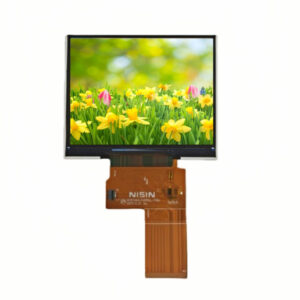


Industrial equipment is changing quickly. Machines that once relied on buttons, indicator lights, and a small LCD are now expected to provide more information and support more user interaction. At the same time, equipment manufacturers are trying to make their products smaller, easier to operate, and simpler to manufacture. This is where serial screens are becoming an interesting option. Unlike a conventional LCD that may require additional display control hardware, a serial display can communicate directly with a host controller through a serial interface. For many embedded applications, this can make the overall display architecture easier to manage. It does not mean that a serial screen is the right choice for every industrial device. However, when space, integration, development time, and user interface requirements all matter, it can offer a practical solution.
What Is Driving the Demand for Serial Screens?
The change is partly related to how people interact with industrial equipment. An operator no longer wants to look at several indicator lights and remember what each one means. A modern interface can show the machine status, operating parameters, warnings, and instructions on one screen. At the same time, the display often needs to fit into a relatively small control panel. That creates a challenge for equipment manufacturers: how can they provide a more capable interface without making the hardware unnecessarily complicated? A serial display can help address this problem because the display and communication functions can be integrated into a compact module. For OEMs, this can make the development process more manageable.
A Serial Screen Can Reduce Unnecessary Hardware
One of the practical reasons manufacturers consider a serial display module is the possibility of reducing the number of components around the display. A conventional display architecture may involve a display panel, a separate controller, additional interface components, and a more complicated PCB design. Depending on the product, this can increase both development work and the physical space required inside the device.
NISIN’s single-chip dual-screen design takes a more integrated approach.
By using a single-chip solution for two displays, the design can reduce the need for multiple display-related components. That can also help lower power consumption and manufacturing costs.
For a prototype, this may not make a dramatic difference. But when a product is manufactured in larger quantities, reducing components can become much more meaningful.
It can affect:
- PCB layout
- Assembly
- Power requirements
- Component sourcing
- Production cost
- Long-term maintenance
For this reason, an industrial serial screen can be worth considering at the beginning of the product design rather than being added later.

Dual Screens Give Designers More Options
Most industrial HMI applications use one display. But there are situations where two small screens can make more sense than one larger screen.
NISIN’s dual-screen solution supports two different operating modes.
Independent Display Mode
Each screen can show different content.
This is useful when two pieces of information need to be displayed independently. It also gives product designers more freedom to create visual interfaces that do not fit the traditional single-screen format.
For example, one screen could display the main status while the other shows a secondary indicator or animation.
Simultaneous Display Mode
Both screens can show the same content.
This is a simpler approach, but it can be useful when the same visual information needs to be synchronized across two display areas. The advantage here is not simply having two screens. It is having the flexibility to decide how those screens work together. That flexibility can be useful for specialized industrial equipment, robotic products, interactive devices, and other embedded systems.

Small Does Not Have to Mean Low Quality
Space is often a problem in industrial product design. A control system may need a display, communication hardware, sensors, and other electronics inside a relatively small enclosure. Installing a large display is not always practical. This is one area where a compact serial screen display can be useful.
NISIN’s 1.5-inch dual-screen display has a resolution of 360 × 360 pixels. The display measures approximately 40.47 × 41.82 × 2.17 mm, while the display area is 38.16 × 38.16 mm.
For a display of this size, the resolution is high enough to handle detailed graphics, text, and animation. That matters because a small industrial display is not necessarily being used only for simple numbers anymore. Designers may want to display icons, graphical indicators, or more visually intuitive information. In a compact product, getting more information into a small area can make a significant difference.
Viewing Angle Matters More Than It First Appears
Industrial equipment is rarely operated with the user sitting directly in front of the screen. An operator might stand to the side of a machine or check the display while moving around a production line. If the image becomes difficult to see from an angle, even a technically good display can become frustrating to use. The IPS technology used in NISIN’s compact display provides a viewing angle of up to 178 degrees. This gives designers more flexibility when deciding where the display should be positioned. It is also useful when color is part of the interface. For example, an HMI may use different colors to distinguish normal operating conditions from warnings or faults. Consistent color performance from different viewing positions helps keep that information clear.
Better Visuals Can Make an HMI Easier to Understand
Industrial interfaces are becoming more graphical. Instead of displaying only text such as “RUN” or “ERROR,” modern equipment can use icons, animations, progress indicators, and color changes to communicate information.
NISIN’s display supports 16.7 million colors, an 800:1 contrast ratio, and 250 nits brightness. These specifications are particularly relevant when the screen needs to display detailed graphics in indoor environments. The goal is not simply to make the display look impressive. A good industrial HMI should make information easier to understand. For example, a clear icon can sometimes communicate a machine state faster than a line of text. A simple animation can show that a process is still running. A change in color can immediately draw attention to a warning. The display becomes part of the communication system between the machine and the operator.

MCU Integration Can Make Development Easier
Another consideration for equipment developers is how the display will communicate with the main control system. Many embedded products already use an MCU as the central controller. If the display can connect to that controller through a suitable interface, developers may be able to avoid designing an unnecessarily complicated display architecture. NISIN’s solution supports MCU integration, making it suitable for embedded applications where the display needs to work together with a microcontroller. This can be useful during product development because engineers can focus more on the actual application rather than building additional display-control hardware from scratch. Of course, interface compatibility still needs to be checked against the specific MCU, software environment, and communication requirements of the project.
Where Can Serial Screens Be Used?
The application range is broader than traditional industrial control panels.
A compact industrial HMI display can be considered for products such as:
- Industrial controllers
- Robotic equipment
- Automation systems
- Portable instruments
- Smart control devices
- Energy-related equipment
- Compact monitoring systems
- Embedded electronic products
The actual display specification will depend on the product. A machine operating in a factory may have different requirements from a portable device. Likewise, an HMI that needs touch interaction will require different considerations from a display used only for status information. This is why manufacturers should start with the application instead of selecting a display based only on size or resolution.
What Should OEMs Consider Before Choosing a Serial Screen?
Choosing a serial screen manufacturer is not just about finding a display with the right dimensions.
There are several questions worth answering before starting production.
How much space is available?
Measure the actual installation area first. Connector position, PCB dimensions, and mounting structure can be just as important as the visible screen size.
What information needs to be displayed?
If the interface includes detailed graphics or small text, resolution and display quality become more important.
How will the display communicate with the controller?
The communication interface needs to match the system architecture and MCU.
Is touch required?
If operators need to interact directly with the screen, touch technology, sensitivity, and operating conditions should be considered during the early design stage.
What are the power limitations?
This is especially important for portable or battery-powered equipment.
Will the display need to be customized?
OEM products often have requirements that cannot be met by a standard module. Customized PCBA dimensions, screen structures, interfaces, or other specifications may be needed to fit the final product. These questions are usually easier to address when the display supplier is involved early in the development process.
Why Work With an Experienced Serial Display Manufacturer?
For a one-off prototype, a standard display may be enough. For an OEM product that will be manufactured for several years, the situation is different. The display needs to fit the mechanical design, communicate with the control system, meet visual requirements, and remain available throughout the product lifecycle. This is where the capabilities of the supplier become important. NISIN provides serial screen and custom display solutions for embedded applications. Its product range includes compact displays, dual-screen designs, IPS displays, and solutions that can be integrated with MCUs. For projects with specific space or PCB requirements, NISIN can also provide customizable PCBA dimensions.The objective is not simply to provide a screen. It is to help manufacturers find a display configuration that makes sense for the complete product.
Are Serial Screens the Right Choice for Every Industrial HMI?
Not necessarily.
A large industrial machine with a complex graphical interface may require a larger display with a different interface architecture. Some applications may also have demanding outdoor visibility, environmental, or touch requirements that need to be evaluated separately. The value of a serial screen is more apparent when the application needs a combination of compact size, straightforward integration, flexible visual output, and embedded control. For smaller industrial products, robotic devices, smart equipment, and other space-constrained systems, these characteristics can be particularly useful.
Final Thoughts:
The growing popularity of serial screens in industrial HMI applications is not driven by one particular specification. It comes from a combination of practical requirements. Equipment manufacturers want smaller products. Engineers want simpler hardware integration. Operators want clearer information. At the same time, manufacturers need to keep production costs under control. A well-designed serial display can address several of these requirements at the same time.
NISIN’s compact dual-screen solution is one example. Its 360 × 360 resolution, IPS technology, 178° viewing angle, 16.7 million colors, 800:1 contrast ratio, 250-nit brightness, MCU compatibility, and customizable PCBA options give manufacturers more flexibility when developing compact interfaces.
For OEMs considering a new industrial HMI, the important question is not simply whether a serial screen is “better” than a traditional display. The more useful question is whether its architecture fits the product. When the answer is yes, a serial screen can simplify the design while giving the final equipment a more capable and modern interface.